



How to Choose Desk Booking Software: 12 Questions to Ask Before You Buy

Choosing desk booking software sounds straightforward until you start comparing solutions. Most platforms promise the same basic functionality: employees can find a desk, reserve it, and arrive at the office knowing where they'll work. But once you look beyond the booking interface, the differences become significant.
Can employees find desks near their teammates? Does the system integrate with Microsoft Teams and Outlook? Can workplace managers identify unused desks, manage multiple office locations, or understand which days are approaching capacity? And perhaps most importantly, will the software still meet your needs as your workplace changes?
For facilities managers, workplace leaders, and IT decision-makers, choosing the right desk booking software means evaluating more than a list of features. The platform needs to work for employees, fit existing technology systems, and give the business enough visibility to manage office space effectively.
This guide covers 12 questions to ask before buying desk booking software, including what to look for in a demo, which capabilities matter for hybrid teams, and how to compare solutions beyond their advertised features.
Why Choosing the Right Desk Booking Software Matters
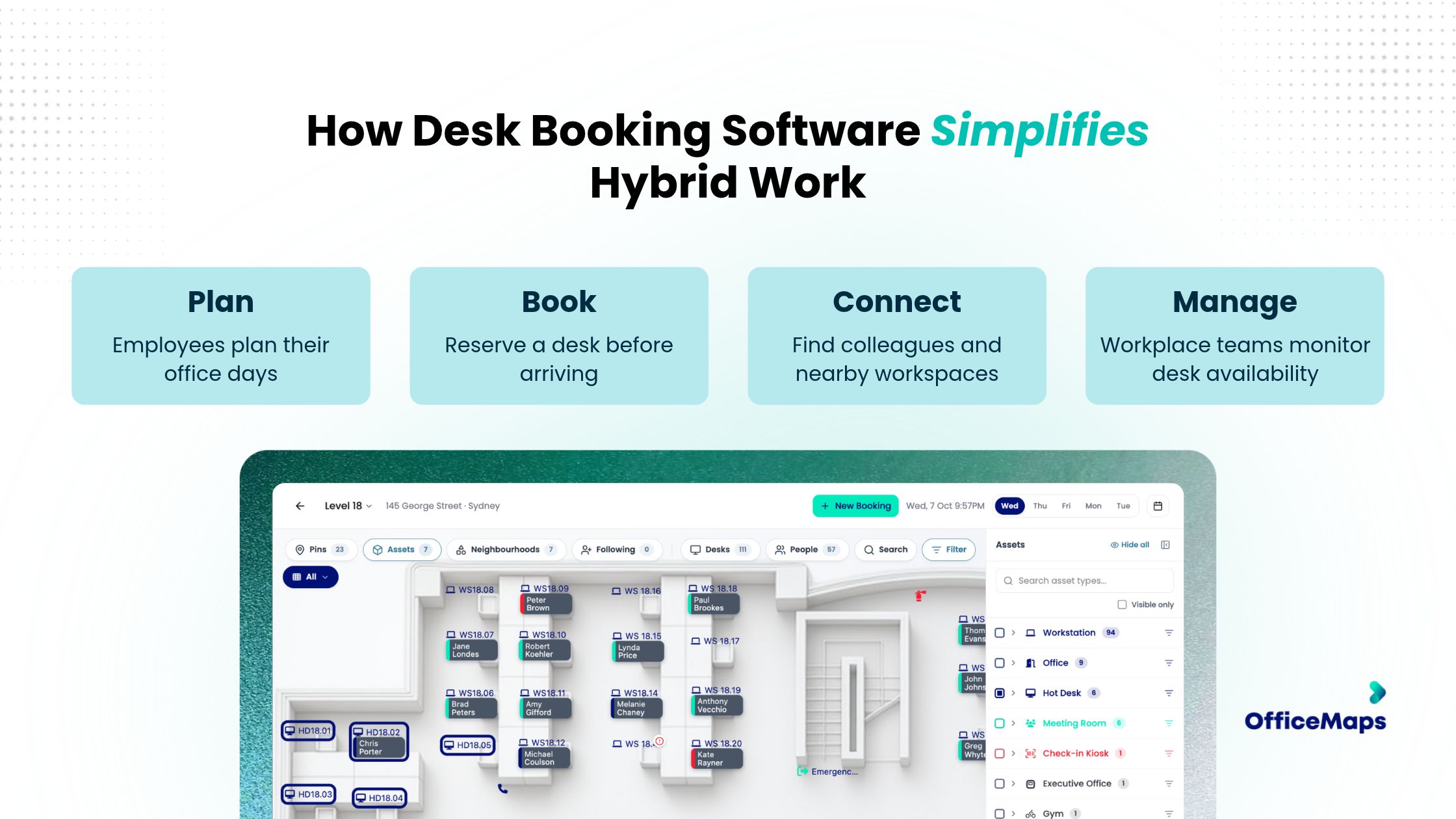
Hybrid work has changed how organisations use office space. Employees no longer necessarily occupy the same desk five days a week. Some attend on designated team days, others visit for meetings, and many divide their time between home and the office.
This creates a challenge for workplace managers. The office must accommodate changing attendance patterns without leaving employees competing for desks or maintaining more dedicated workstations than necessary. A reliable desk booking system helps employees reserve workspaces in advance while giving facilities teams greater control over how shared desks are allocated.
But the right solution should do more than prevent double bookings. It should help organisations answer practical questions about their workplace:
- How many desks are available on a particular day?
- Can employees sit near the colleagues they're working with?
- Which floors or departments experience the highest demand?
- Are reserved desks actually being used?
- Can employees manage bookings through familiar workplace tools?
- Will the platform support additional offices, teams, or changing attendance policies?
The answers depend on the capabilities of the software you choose.
Understanding the Different Types of Desk Booking Solutions
Before comparing vendors, it's useful to understand the terminology used across the market. Terms such as hot desk booking software, office hoteling software, and desk sharing software are often used interchangeably. However, they can describe different approaches to managing shared workspaces.
The distinction matters because not every organisation needs the same level of functionality. A small business with one office may only need a straightforward desk reservation system. A larger organisation managing hybrid teams across several locations may require a more comprehensive office desk booking system with integrations, reporting, and centralised administration.
When evaluating desk booking solutions, focus on how the platform supports your workplace operations rather than which category a vendor uses to describe its product.
12 Questions to Ask Before Buying Desk Booking Software
1. Is the Desk Booking Software Easy for Employees to Use?
The most feature-rich desk booking system won't deliver much value if employees find it difficult to use. Booking a desk should be a simple process, particularly for employees who only visit the office a few days each week. Before choosing a platform, consider the complete employee experience. Can someone quickly identify available desks? Can they see where a workstation is located? Can they make or change a reservation without contacting the facilities team? Ideally, employees should be able to complete a booking in just a few steps.
What to check during a demo:
- How many steps does it take to reserve a desk?
- Can employees view available desks without navigating multiple screens?
- Can they modify or cancel reservations easily?
- Is the interface accessible on desktop and mobile devices?
- Can new employees understand the system without extensive training?
Where OfficeMaps fits: OfficeMaps provides interactive workplace maps that help employees visually locate and book available workspaces, rather than selecting desks from an unfamiliar list of workstation numbers.
2. Does It Support Hot Desking, Desk Hoteling, and Hybrid Work?
Not every organisation uses the same seating arrangement. Some have permanently assigned desks. Others operate entirely through hot desking, while many use a combination of dedicated and shared workstations.
The right hot desking software should support your existing workplace model without forcing you to redesign how employees work. For example, a business might reserve certain desks for specific departments while making the remaining workstations available for flexible booking.
Another organisation might allow employees to reserve desks several days in advance to support scheduled hybrid attendance. When comparing a hot desk booking system or office hoteling software, check whether it supports the booking arrangements your teams actually need.
What to check during a demo:
- Can the platform support assigned and shared desks?
- Can employees reserve workspaces in advance?
- Can administrators control which desks are available for booking?
- Can different teams or locations have different booking arrangements?
- Can the system accommodate changes in hybrid work policies?
Where OfficeMaps fits: OfficeMaps supports desk booking and workplace mapping for organisations managing shared and assigned workspaces, helping employees understand where they can work and how available desks are organised.
3. Can Employees Find Desks Near Their Teammates?
One of the main reasons employees visit the office is to work with colleagues. Yet many desk reservation systems focus entirely on whether a workstation is available, without considering where it is located or who else is attending.
This can create a frustrating experience. An employee books a desk, arrives at the office, and discovers that the rest of their team is sitting on another floor. For hybrid teams, desk booking should support collaboration, not just workspace allocation.
What to check during a demo:
- Can employees see where colleagues are located?
- Can they find available desks near teammates?
- Does the platform display desk locations on a visual floor plan?
- Can employees identify suitable workspaces before arriving?
- Does it support coordination across teams sharing the same office?
Where OfficeMaps fits: Interactive floor plans and colleague location capabilities are central to OfficeMaps. Employees can use workplace maps to find people and workspaces, making it easier to coordinate their time in the office. Desk booking should make office days easier, not more complicated. See how OfficeMaps combines interactive floor plans, desk reservations, and workplace visibility to help employees find the right place to work.
4. Does It Integrate With Microsoft Teams, Outlook, and Microsoft 365?
Introducing another workplace application can create unnecessary friction if it doesn't work with the tools employees already use. For organisations operating within the Microsoft ecosystem, integration capabilities should be an important part of the buying decision.
Desk booking software with Microsoft Teams integration may help employees access workplace reservations through familiar workflows. Outlook and Microsoft 365 compatibility can also be important when managing workplace calendars, user identities, and shared resources. However, vendors use the term integration differently.
One platform may offer a direct Teams application, while another may connect through Microsoft 365 services or provide calendar synchronisation. These aren't necessarily equivalent capabilities.
What to check during a demo:
- Is there a native Microsoft Teams integration or a different connection method?
- Can desk reservations be managed through Outlook?
- Does the platform support Microsoft 365 and Entra ID?
- Can employee accounts and access permissions be managed centrally?
- What setup and ongoing administration are required?
Where OfficeMaps fits: OfficeMaps supports Microsoft 365, Entra ID, and Exchange integrations. If Teams-based booking is a requirement, ask for a demonstration of the specific workflow and confirm whether it meets your organisation's needs.
5. Can It Prevent Double Bookings and Manage Desk Availability?
Preventing two employees from reserving the same desk at the same time is a basic requirement. But managing availability becomes more complex when organisations have different departments, booking windows, shared spaces, and peak attendance days.
A suitable desk booking system should make availability clear to employees while giving administrators control over how workspaces are allocated. For example, facilities managers may need to temporarily remove desks from availability during maintenance or restrict particular workstations to certain teams.
What to check during a demo:
- Does the system prevent overlapping reservations?
- Can administrators mark desks as unavailable?
- Can booking permissions or restrictions be configured?
- How are cancellations handled?
- Can employees identify alternative desks when their preferred area is full?
Where OfficeMaps fits: OfficeMaps gives employees visibility into bookable workspaces through interactive floor plans and helps workplace teams manage desk availability. Confirm the specific booking rules and administrative controls required for your organisation during a demo.
6. Does It Provide Office Occupancy Tracking and Workplace Analytics?
Desk booking data can tell workplace managers how many workstations have been reserved. But reservations alone don't necessarily reveal how the office is being used. An employee may book a desk and not attend. Another may arrive without making a reservation.
That's why organisations evaluating desk booking software with office occupancy tracking should understand the difference between bookings, presence, and actual utilisation.
A platform with useful workplace analytics can help managers identify patterns such as:
- Which days have the highest booking demand
- Which desks or floors are frequently reserved
- Whether certain office areas are underused
- How demand changes across teams and locations
- Whether existing capacity is sufficient for peak attendance
This information can support decisions about seating arrangements, office layouts, and future space requirements.
What to check during a demo:
- What workplace utilisation metrics are available?
- Can managers review historical booking patterns?
- Does the system distinguish reservations from actual attendance?
- Can reports be filtered by floor, location, or time period?
- Can workplace data be exported for further analysis?
Where OfficeMaps fits: OfficeMaps includes workplace analytics capabilities that can support space planning and utilisation analysis. Ask which metrics are available, how they're collected, and whether additional presence data or integrations are required.
7. Can the Software Manage Meeting Rooms and Other Shared Spaces?
Desk reservations are often only one part of managing a hybrid office. Employees may also need meeting rooms, collaboration areas, parking spaces, and other shared workplace resources.
If these activities are managed through separate systems, employees may need to switch between multiple applications to organise a single office visit. For workplace managers, disconnected systems can also make it harder to understand how different spaces are being used. A broader workplace management solution can simplify these activities by bringing them into a more connected experience.
What to check during a demo:
- Does the platform support meeting room booking?
- Can employees reserve parking spaces or other shared resources?
- Are available spaces displayed on workplace maps?
- Can administrators manage multiple resource types?
- How does the platform integrate with existing room calendars?
Where OfficeMaps fits: Alongside desk booking, OfficeMaps supports meeting room and parking booking, allowing organisations to manage several types of workplace resources within the same platform.
8. Can It Support Multiple Offices, Floors, and Growing Teams?
A desk booking solution that works for 50 employees in one office may not be suitable for an organisation with several hundred employees across multiple locations. As businesses grow, workplace management requirements become more complex.
Different offices may have different layouts, desk-sharing arrangements, attendance patterns, and administrative responsibilities. Desk booking software for enterprise workplaces should be evaluated for its ability to accommodate those differences without creating excessive management overhead.
What to check during a demo:
- Can the platform manage multiple buildings and floors?
- Can administrators manage different locations centrally?
- Are location-specific booking rules supported?
- Can workplace maps be updated as layouts change?
- How does pricing change when additional users or locations are added?
Where OfficeMaps fits: OfficeMaps supports workplace mapping and resource management across office environments. Organisations with multiple locations should request a demonstration using a representative version of their workplace structure.
9. How Easy Is It for Facilities and IT Teams to Administer?
Employees need a straightforward booking experience. Facilities and IT teams need a system that's equally manageable behind the scenes. Consider what happens when desks are added, teams move between floors, or office layouts change.
If every adjustment requires vendor assistance or a complicated manual process, ongoing administration can become time-consuming. The right hot desk management software should give authorised administrators appropriate control over workplace resources and booking arrangements.
What to check during a demo:
- Can administrators update floor plans and desk information?
- How are employee accounts created and managed?
- Can different teams receive different administrative permissions?
- What support is available for initial implementation?
- How much ongoing maintenance does the platform require?
Where OfficeMaps fits: OfficeMaps brings workplace mapping and desk management together, helping organisations maintain a visual representation of their workplace as seating arrangements and resources change.
10. Does It Meet Your Security and Data Management Requirements?
Desk booking platforms may process employee names, workplace locations, booking schedules, and other organisational information. For IT leaders, security and data governance should therefore be part of the software evaluation process.
This becomes especially important for organisations operating across multiple jurisdictions or handling sensitive workplace information. Before purchasing, involve the appropriate IT, security, and privacy stakeholders.
What to check during a demo:
- What authentication methods are supported?
- Does the platform integrate with your identity management system?
- What employee information is collected and stored?
- Where is organisational data hosted?
- What access controls and retention settings are available?
- Can the vendor provide relevant security and compliance documentation?
Where OfficeMaps fits: OfficeMaps supports Microsoft Entra ID integration, which may help organisations align user identity management with their existing Microsoft environment. Specific security certifications, data residency, and privacy requirements should be confirmed directly with the vendor.
11. What Is the Total Cost of the Desk Booking Software?
When comparing desk booking solutions, the advertised subscription price doesn't always reflect the full cost of ownership. Vendors may structure pricing around employees, active users, desks, office locations, or different product tiers. Additional costs may apply for implementation, integrations, advanced reporting, or support. This means two platforms with similar advertised prices may have substantially different costs once deployed.
What to check during a demo:
- Is pricing based on employees, desks, or locations?
- Are there minimum user or licence requirements?
- Which features are included in the standard subscription?
- Are integrations or analytics priced separately?
- Are onboarding and implementation included?
- What happens to pricing as the organisation grows?
When comparing costs, consider the value of employee convenience, administrative efficiency, and better workplace planning alongside the subscription fee. Where OfficeMaps fits: Request pricing based on your organisation's size, number of locations, and required capabilities. A tailored quote will provide a more useful comparison than an assumed per-user cost.
12. Can the Platform Support Your Workplace Beyond Desk Booking?
This is arguably the most important question for organisations planning a long-term investment. Your immediate requirement may be to introduce hot desking or replace a manual reservation process.
But what happens when attendance increases, teams adopt new hybrid schedules, or management needs better information about office utilisation? A desk booking system that only handles reservations may eventually need to be supplemented with separate tools for meeting rooms, workplace visibility, analytics, and space management. Before purchasing, consider whether the platform can support your workplace as requirements evolve.
What to check during a demo:
- Can the platform support more than desk reservations?
- Does it provide workplace mapping and colleague visibility?
- Are room booking and analytics available?
- Can it adapt to changing seating arrangements?
- Does it integrate with your existing workplace technology?
- Can it support future office expansion or consolidation?
Where OfficeMaps fits: OfficeMaps combines desk booking with interactive workplace maps, room and parking booking, colleague visibility, and workplace analytics. This makes it worth evaluating for organisations seeking a broader workplace management solution rather than a standalone desk reservation tool.
Why OfficeMaps Is Worth Considering for Your Desk Booking Software Shortlist
If you're looking for a basic tool that lets employees reserve desks, several desk booking solutions may meet that requirement. But if your organisation needs to manage how people, desks, meeting rooms, and office space work together, it's worth considering a broader platform.

OfficeMaps is designed to help organisations manage their physical workplaces through connected booking, mapping, and workplace visibility capabilities. For facilities managers, workplace leaders, and IT teams, these capabilities can make OfficeMaps a useful option when comparing desk booking software for hybrid offices.
Final Thoughts: Choose Software That Fits How Your Workplace Operates
Buying desk booking software is about more than introducing a reservation system. It's an opportunity to improve how employees use the office, how teams collaborate, and how workplace managers plan for changing demand.
Before making a decision, look beyond the booking interface. Evaluate how the software handles shared seating, integrates with your existing systems, supports workplace visibility, and provides the information needed to manage office space effectively. Most importantly, ask vendors to demonstrate how their software would work in your actual workplace. A solution that looks impressive in a feature comparison should also be practical for the employees and administrators who will use it every day.
See How OfficeMaps Could Work in Your Workplace
Whether you're introducing hot desking, managing hybrid teams, or looking for a better way to organise shared office space, OfficeMaps can help you evaluate a more connected approach to workplace management. See interactive floor plans, desk booking, colleague visibility, and workplace management capabilities in action.
Frequently Asked Questions
1. What features should I look for in desk booking software?
Look for desk booking software that offers an intuitive reservation process, interactive floor plans, real-time desk availability, support for hot desking and assigned seating, mobile access, and integration with existing workplace tools. For larger organisations, workplace analytics, multi-location management, administrative controls, and employee visibility are also important. The right features depend on your office size, hybrid work arrangements, and operational requirements.
2. What is the best desk booking software for hybrid teams?
The best desk booking software for hybrid teams is one that makes it easy to reserve desks, find colleagues, coordinate office visits, and manage changing workplace demand. Look for a platform that supports flexible seating, workplace maps, and integration with existing business systems. OfficeMaps is an option worth evaluating because it combines desk reservations with workplace mapping, colleague visibility, and broader workplace management capabilities.
3. What is the difference between hot desking and desk hoteling?
Hot desking is a flexible seating arrangement where employees use available desks rather than permanently assigned workstations, often selecting a desk when they arrive. Desk hoteling typically involves reserving a specific workstation in advance for a particular day or period. Both approaches support shared workspaces, and modern hot desk booking software can help organisations manage either arrangement.
4. How does a desk booking system work?
A desk booking system allows employees to view available workstations and reserve a desk for a selected date or time. Employees typically access the system through a web or mobile interface, choose a workspace, and confirm their reservation. The software updates desk availability to prevent conflicting bookings. More comprehensive desk reservation software may also include interactive office maps, colleague visibility, booking rules, and workplace utilisation reporting.
5. Can desk booking software integrate with Microsoft Teams and Outlook?
Yes, some desk booking software platforms offer integrations with Microsoft Teams, Outlook, and Microsoft 365. However, integration capabilities vary between vendors. Some provide native Teams booking experiences, while others support calendar synchronisation, identity management, or connections with Microsoft services. OfficeMaps supports Microsoft 365, Entra ID, and Exchange integrations. Organisations requiring a specific Microsoft Teams or Outlook booking workflow should verify its availability during a product demonstration.
6. How much does desk booking software cost for businesses?
Desk booking software pricing varies depending on the vendor, number of users, office locations, included features, and licensing model. Some providers charge per user or desk, while others offer location-based or customised enterprise pricing. Additional costs may apply for implementation, integrations, analytics, or support. Businesses should compare the total cost of ownership rather than subscription prices alone. For OfficeMaps, request a quote based on your workplace requirements and the capabilities you need.
Think your team could benefit from a tool that makes hot desk booking efficient and easy to use across all teams? You can start your free trial today.
Start Free Trial