
Desk booking software that shows you more than what's free
See available desks on a live office map, find where your colleagues are sitting and book the right space in seconds.

OfficeMaps makes desk booking part of the workplace, not another calendar employees have to manage.
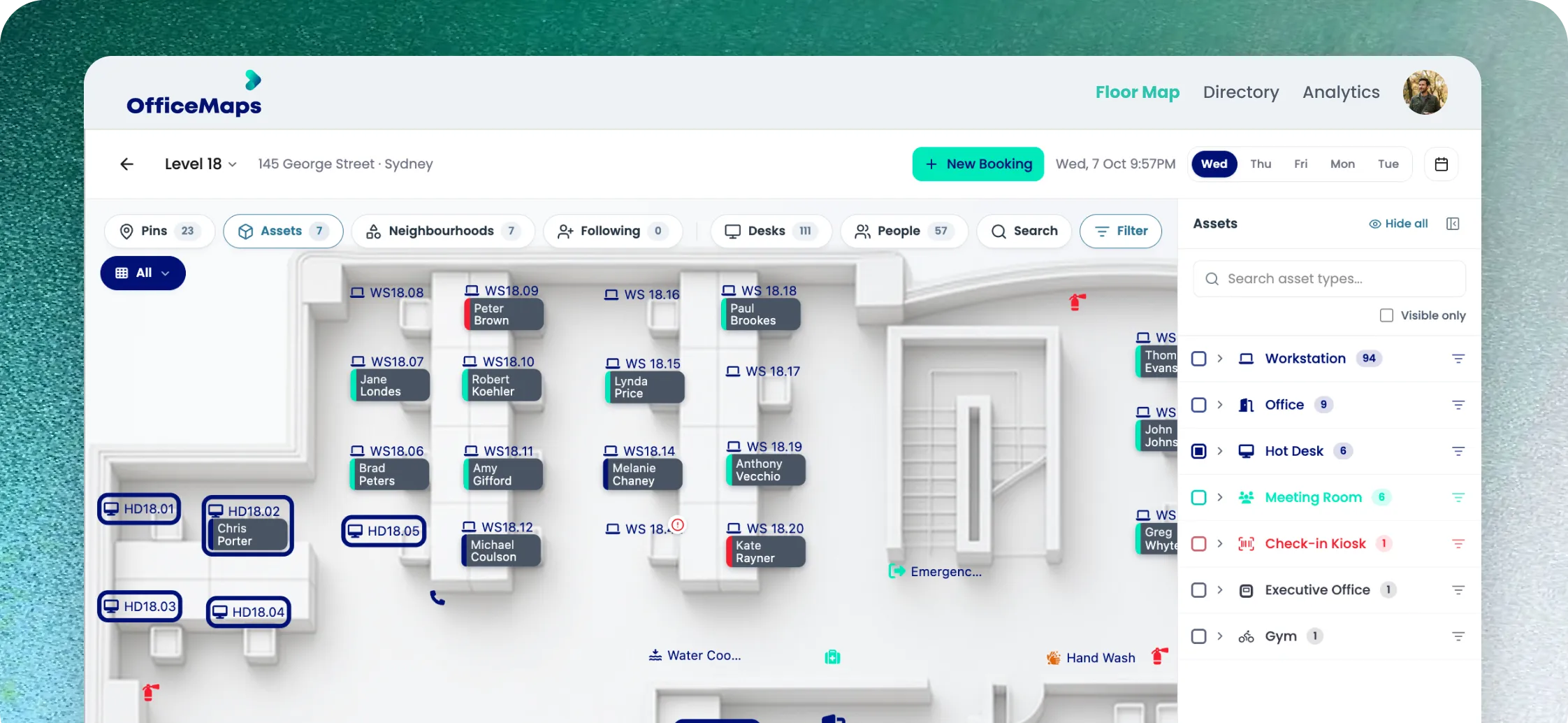

Don’t just book a desk. Book the right desk.
A free desk isn't always the desk you need.
Maybe you want to sit with your team. You need dual monitors. You prefer a standing desk. Or you need a workspace close to the lift.
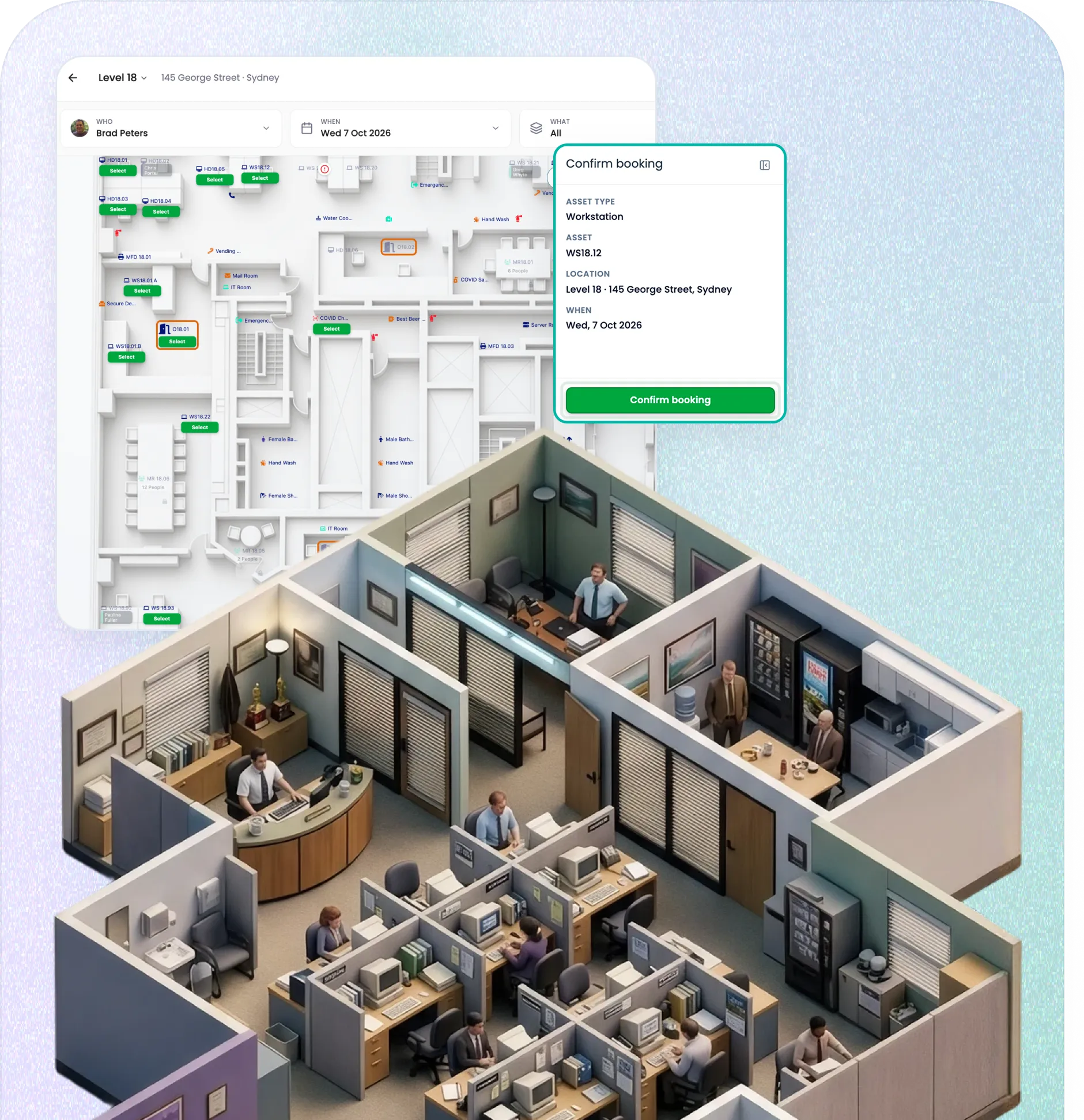
OfficeMaps lets employees see available desks on an interactive floor plan, filter by what they need and book with a few clicks.

See who’s in before you decide where to sit
Office days work better when the people you need are actually there.
See who’s working from the office, find where colleagues are sitting and book a desk nearby.
No messages asking, “Are you coming in tomorrow?”No arriving to find your team on another floor.
Book from the map, Teams, Outlook or your phone
Employees can reserve desks wherever they already plan their workday.
Interactive Office Map
See available desks and who’s sitting nearby before booking.

Microsoft Teams & Outlook
Book without leaving the tools your team already uses.
Web & mobile
Reserve, manage and check into bookings wherever you are.
Make desk booking work around your office
Not every desk should be available to everyone, all the time.
Set booking windows. Create team neighbourhoods. Add desk attributes. Manage permanent and bookable desks together. Let administrators book on behalf of employees.
OfficeMaps gives workplace teams control over how desks are shared without making booking complicated for employees.
Empty booking?
Put the desk back to work.
A reserved desk isn’t necessarily an occupied desk.
OfficeMaps check-ins confirm who actually arrived. If someone doesn’t check in within your configured window, the reservation can be cancelled and the desk released for someone else. Less ghost booking. More usable space.
Your booking data should tell you something
See which desks are booked. And which ones you actually need.
OfficeMaps turns desk reservations and check-ins into workplace utilisation data.
See:
which days bring the most people into the office
which desks and areas are used most
how different teams use their allocated space
where capacity is sitting unused
where teams are running out of room
So desk booking doesn’t just organise today.
It helps you plan what your office needs next.
Everything behind a better desk booking system
Live desk availability
See exactly what's open and secure your workspace in real-time before you even leave your house. Less search, more focus.

Interactive floor plans
Choose your desk visually on a live office map instead of guessing from a blind list.

Desk attributes
Easily filter for standing desks, dual monitors, or specific tech setups near power outlets.

Team neighbourhoods
Keep departments and product squads together naturally while maintaining flexible seating.

Employee presence
Instantly see who is currently in the office, working remotely, or out on vacation.

Check-ins
Confirm real attendance at your desk or release unused bookings back into the office pool automatically.

Admin booking
Empower your workplace experience team to easily reserve and allocate spaces on behalf of colleagues.

Insights
Turns booking, attendance and occupancy data into clear utilisation insights, helping you make smarter, evidence-based workplace decisions.
Find a desk. Find your people. Know what space you need.
Give employees an easier way to plan office days and give workplace teams the data to manage every desk behind them.